
How to Create an SEO Dashboard That Actually Gets Looked At
Within a month, most SEO dashboards die. Too many metrics, no clear story, nobody checking after week two. A dashboard worth building answers a handful of real questions at a glance.
Start with the questions, not the metrics. Work backward from there.
Decide What Questions the Dashboard Needs to Answer
Growing or shrinking, organic traffic. Up or down, which keywords. Converting into leads or sales, or not. Three questions cover most of what a business owner actually cares about.
A different set entirely serves technical teams. Crawl errors, indexing status, Core Web Vitals scores. Different audience, different dashboard, even when both pull from the same underlying data.
Build the dashboard around the actual audience reading it. Neither an executive nor a technical SEO specialist gets served well by one dashboard trying to satisfy both. Both dashboards pull from the same feed, and how Google Search Console works decides what is available.

Choose the Right Tool for the Job
Free and flexible, Google Looker Studio connects directly to Search Console and Analytics data. Most small businesses never need anything beyond this for a solid starting dashboard.
Built-in reporting dashboards come from both Ahrefs and Semrush, pulling from their own keyword tracking data. Useful for ranking-specific views. Usually paired with Looker Studio for the traffic and conversion side, though.
Spreadsheets still work fine for smaller sites tracking a handful of keywords. Not glamorous, but functional. Faster to set up too, for a very small keyword set.

Pick the Metrics That Actually Matter
Almost every dashboard needs organic traffic trend over time. Momentum shows through month over month. Seasonal noise gets filtered through year over year. Both angles matter.
A defined set of priority terms beats tracking everything a site ranks for. Fifty carefully chosen keywords tell a clearer story than five thousand tracked indiscriminately.
Actual business outcomes get tied to SEO work through conversion data. Leads, calls, form submissions, purchases, whatever counts as a conversion for that specific business. Half the story is all traffic tells without this context.

Structure the Dashboard for Quick Reading
The most important number belongs at the top, always. Whatever answers the primary question first should hit the viewer’s eyes immediately. Not buried three scrolls down.
Faster than raw numbers alone, trend lines communicate. Two seconds tells the story through a graph showing six months of traffic movement. A table of monthly totals never quite manages that.
Group related metrics together visually. Traffic in one section. Keyword rankings in another. Conversion data in a third. Hunting for the story replaces seeing it the moment these get mixed randomly.

Set a Review Cadence That Sticks
Active campaigns still building momentum do well with weekly reviews. Established, stable campaigns suit monthly reviews better, where week-to-week noise matters less than the longer trend.
A Calgary SEO client meeting benefits enormously from a dashboard built around this same principle. Five minutes covers three or four key numbers. Two minutes loses the room entirely with fifty scattered metrics instead.
Automate the data refresh wherever possible. Almost without exception, a dashboard requiring manual updates every week quietly stops getting updated within a month or two.

Connect the Right Data Sources
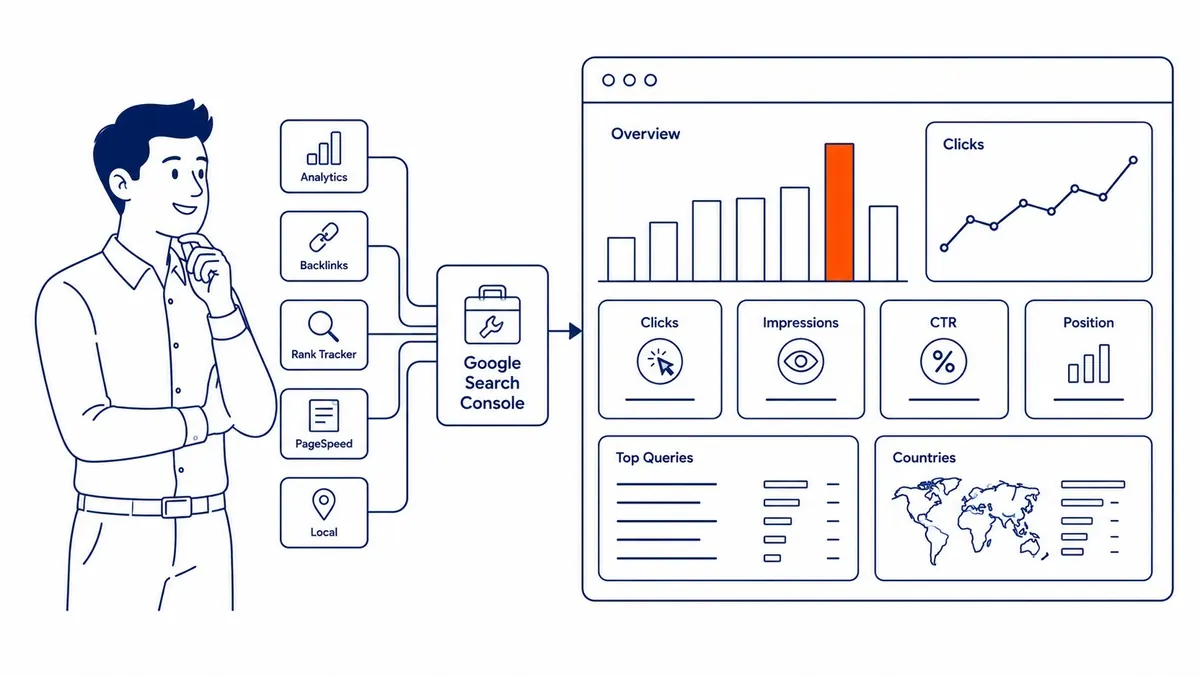
Almost any real SEO report starts with Google Search Console as the foundation. Clicks and impressions flow straight from that one source. Average position and click-through rate too, directly into a Looker Studio dashboard with minimal setup.
The conversion layer Search Console alone can’t provide comes from Google Analytics. Sessions, goal completions, revenue where applicable. All mapped against the same date ranges as the Search Console data sitting alongside it.
A real gap gets filled by Ahrefs or Semrush data here. Keyword positions Search Console doesn’t report cleanly. Particularly low-click-volume terms Google sometimes omits from its own reporting entirely.
Some setup work upfront comes with combining these sources into a single report. That investment pays off every time the dashboard gets pulled up instead of three separate tools opened side by side.
Avoid the Reporting Traps That Waste Everyone’s Time
Far too many SEO reports let vanity metrics sneak in. Total keywords ranked, for instance, means little without knowing how many of those rankings actually drive traffic worth reporting on.
Non-technical stakeholders get lost fast by overly technical reports. Rarely does a report built for an SEO specialist translate well to a business owner glancing at it between meetings. Solid underlying data doesn’t fix that mismatch alone.
Wasted setup effort is what static reports that never get revisited amount to. Usefulness well beyond the first month comes from a quarterly check on whether the report still answers the right questions. Ask how an agency handles analytics reporting before the first dashboard gets built. Go back to a definition of SEO reporting when the document stops answering anything.
Frequently Asked Questions
What’s the best free tool for building an SEO dashboard?
Google Looker Studio, formerly Data Studio, is the standard free choice here. Direct connection to Search Console and Analytics, no coding required. Most small-to-midsize business reporting needs get covered without a paid tool.
How many metrics should an SEO dashboard include?
Five to ten core metrics is a reasonable range for most dashboards. Too many questions for one audience is usually what more than that signals, and clarity takes the hit. That clarity is the whole point of a dashboard in the first place.
How often should an SEO dashboard get updated?
Automatically, ideally, daily or weekly depending on the tool, is how data should refresh. The dashboard itself, meaning which metrics show and how it’s organized, deserves a revisit every few months as priorities shift. See the SEO blog for more on tracking SEO performance over time.
Contact Calgary SEO Company To-The-TOP!
Questions about anything in this article, or about your own rankings? Talk to a Calgary SEO specialist directly.
Phone: (403) 308-5949
Address: 1509 14 Ave SW, Calgary, AB T3C 0W4
Hours:
Monday to Friday: 10:00 am – 7:00 pm
Saturday: 12:00 pm – 4:00 pm
Sunday: closed