
How Many Internal Links Per Page Is Right for SEO?
Clients ask me for one number. They want me to say “eight” or “twelve” and get back to work. I get it. SEO Company To-The-TOP! has run SEO in Calgary since 2007, and this exact question lands on nearly every content review I sit through. The honest answer is a range. Not a digit. And the range moves with how long the page runs and what job it does.
Here is the working version most teams can use today. Roughly one internal link for every 200 to 300 words of body copy. On a short post, that is three to five contextual links. A long guide like this one runs nearer eight to twenty. The old 100-links-per-page ceiling still floats around, though Google relaxed that guidance years ago. So publish a 1,200-word article with four or five good internal links woven in and you are already in healthy shape. Go lighter and the post still ranks. Push much heavier and you start fighting yourself.
Now the part nobody likes. The question itself points at the wrong thing. “How many internal links per page” almost always means links going OUT of a page. The data that predicts ranking movement? That is about links coming IN to a page. Different variable, different lever entirely. More on why that beats any per-page quota you have read.
The short answer, and why the question is slightly off
Start with the numbers. That is what brought you here.
One link per 200 to 300 words is the rhythm I aim for in body content. So a 1,000-word page tends to land around three to five contextual links, and once you push past 1,500 or 2,000 words, seven to ten reads naturally. A 3,000-word pillar can carry eight to twenty, though only when enough genuinely relevant destinations exist. Remember these are ratios for editorial links inside the main content, not a hard cap on every clickable thing on the page.
Then there is the total-links figure. Some guides quote 150 to 200 links per page as a safe maximum. Others still cite the historical 100-link limit Google published back when crawl budgets were tighter. Both numbers describe a ceiling you rarely want to approach. Neither is a target to chase. Plenty of Calgary business sites I have audited never crossed 30 links on a page. They ranked perfectly well.

The reframe is the useful bit. People search “how many internal links per page” picturing the links they sprinkle into an article. Fair question. Wrong emphasis, though. The studies that tie internal linking to traffic measure incoming links. As in, how many other pages on your own site point AT the URL you care about. Two incoming internal links versus forty? That same money page behaves like two different URLs. The gap is where rankings actually move. Most owners never look at it.
So keep the outgoing ratio in your head as a sanity check. Spend the real attention on the incoming side. The rest of this guide works through both, plus the practical math nobody seems to mention. Incoming links matter most when creating pillar pages for SaaS SEO, where the cluster points inward.
Internal links, external links, and backlinks: not the same thing
Quick cleanup first. The words get muddled constantly.
An internal link points from one page on your site to another page on the same domain. Your about page linking to your services page. Internal. An external link heads out from your page to a different website entirely, say you citing a Statistics Canada report. A backlink runs the other way, another site pointing in toward you.
Why does the distinction matter here? The rules differ. External links call for caution: be sparing, cite quality sources only. Internal links flip that. Full control, far more freedom, since you own every destination. You decide what connects to what, and which pages get reinforced. Nobody penalizes you for organizing your own house well.

Internal links also pass a slice of ranking value between your own pages. External links to other domains do not do that for you. So they sit among the few ranking inputs entirely in your hands. No outreach. Nothing to wait on from a journalist. Just thoughtful structure, page by page. For the wider picture on how this all fits, our breakdown of search engine optimization covers where linking sits among the other levers.
One more cleanup while we are here. Keep your internal links dofollow. A myth still circulates that slapping a nofollow tag on internal links steers equity toward your priority pages, a trick people called PageRank sculpting. It does not work the way the myth claims. Google stopped passing equity through nofollowed links to the rest of the page years ago. So nofollowing your own internal links just burns the value you could have passed along. Reserve nofollow for links you genuinely do not want tied to your site. On most business sites, that is almost none of them.
What internal links actually do for your rankings
Four jobs. Each one is real. Only one of them gets oversold.
Crawling and indexing
Crawlers follow links. That is how they move.
Googlebot lands on a page. Reads the links. Queues the destinations to visit next. A page with no internal links pointing to it? The crawler may never reach it through normal browsing. It sits there, orphaned, waiting on your sitemap and a bit of luck. New content gains the most here. A link or two from an established page is the fastest signpost telling search engines a fresh URL exists. Faster discovery, faster indexing. Plain cause and effect. I have watched a brand-new service page sit unindexed for weeks, then land in Google within days of a single link from the homepage. Nothing else changed. One link did it.

Link equity and PageRank flow
Here is where the topic gets mystified. Every page on your website holds a bit of ranking value. Some of it comes from backlinks, some from where it sits in your structure. Internal links then hand a share of that value to whatever they point at. The classic term is PageRank. Most people now say link equity, or, less precisely, “link juice.”
The mechanics are simple. A page splits its passable value among its outgoing links. Ten links each carry a bigger share than fifty would. That is the grain of truth under the “too many links dilutes” warning. Honest take, though, after years of this for small and mid-sized businesses. Obsessing over equity sculpting at this scale is mostly wasted energy. Unless you run a site with tens of thousands of pages, passing equity through twelve links versus eighteen will not show up in your rankings. Link helpfully and the math sorts itself out. I would rather you worry about which important pages have too few incoming links.

Site hierarchy and topical authority
Links tell search engines what relates to what.
Say your guide on snow removal links to three articles on winter property maintenance. You just signalled a cluster. These pages belong together. They cover one broad subject from several angles. Google reads that and starts to grasp which page anchors a topic and which ones support it. Keep the pattern up and topical authority accumulates, the sense that your site is a genuine resource on a subject rather than a one-off page that happened to rank. A solid website audit usually starts by mapping exactly this, hunting for the clusters that have gone thin.
User experience and dwell time
People click helpful links. That is the whole game.
A reader finishes a paragraph. Some question forms in their head. And there sits a link answering it. Click. Then they stay longer, reading another page or two. Longer sessions, more pages per visit, that is what you want, both for your users and for the engagement signals search engines watch. Bad linking does the reverse. Stuff a sentence with five links and users trust none of them. So the test I lean on hardest is simple. Would a real person find this link useful right here? If yes, keep it. Added only to chase a number? Cut it. Where the links point matters as much as the count, which is best site structure explained in one line. Orphan pages surface fast in a technical SEO site audit, which is worth running yearly.

So how many internal links per page? The real ranges
Back to the digit you actually wanted. Here it is by situation, because one rule never fits every page.
By content length
Match the link count to the words. Longer pages earn more links. They cover more ground and offer more natural exits.
The bands from the last section hold here, so I will spare you the repeat. What matters is the principle behind them. A thin 600-word post demanding ten internal links is telling you something. Either it is too short for its ambitions, or half those links are filler. I would rather see four links a reader genuinely wants to follow than ten crammed in to look thorough. The longer the piece, the more honest links it holds, and the count climbs on its own without the text ever feeling stuffed.
By page type
Different pages, different jobs.
A blog post leans on contextual links inside the prose. They point at related articles and the relevant service or product. Product pages do well with five to ten internal links each. Related products, the parent category, a little supporting detail. Enough to help a shopper, while staying clean enough to convert. Category pages act as hubs. They naturally carry more links out to the items they organize. The homepage has no official maximum, though I keep mine focused, pointing at the handful of destinations that matter most rather than every URL on the site. It usually holds your strongest authority. Where it points carries weight.
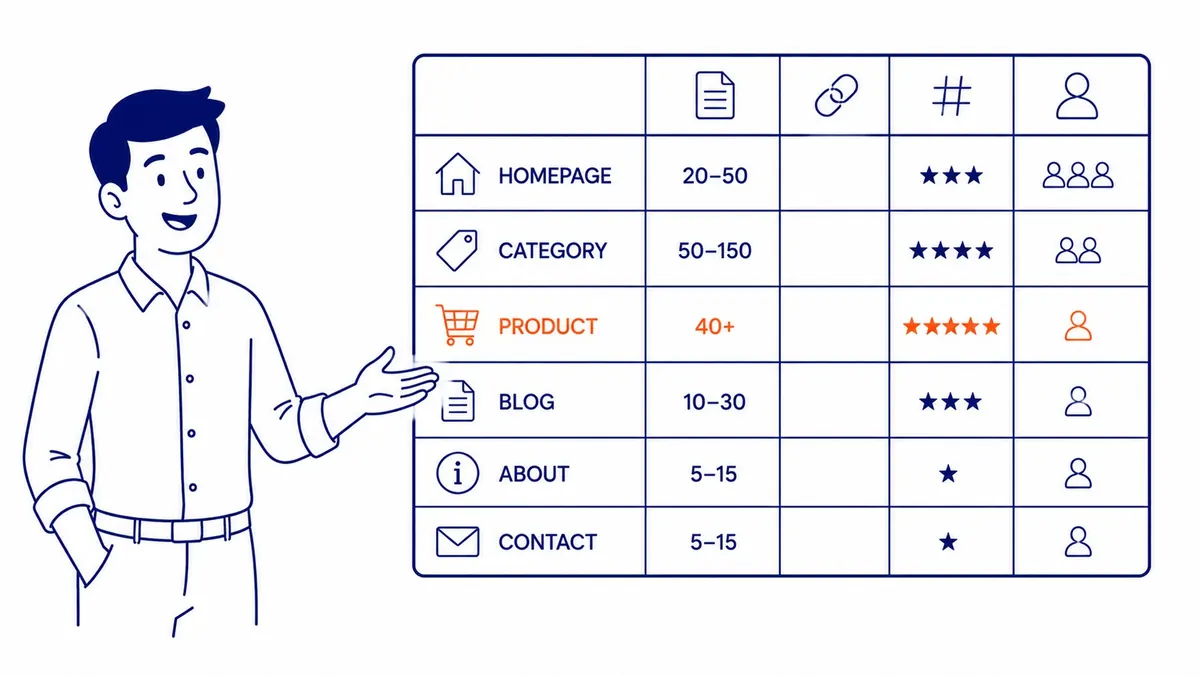
E-commerce is where the page-type question gets sharpest. A category page listing forty products will carry forty-plus links out to them. Fine. Every one helps a shopper. Trouble starts when faceted navigation and filter combinations spawn thousands of near-duplicate URLs, each one linking to the next. That is the over-linking pattern that actually causes problems. A structural issue, not a body-copy one. Small catalogue, barely an issue. On a large one, the fix lives in how you handle filters and pagination, not in trimming a link or two from a product description.
Local service and city pages
This is the part the big SEO blogs skip entirely. It matters most to the businesses I work with.
A local company running separate service pages and city pages has an internal-linking job those national SEO guides never touch. Each service page should link to the related services a customer might also need. Every city page should connect to the core service it describes and back to the main service hub. Miss those connections and you strand pages that could rank. That is the single most common problem I find on Calgary business sites. We will come back to it, because it earns its own section. If you sell several services across multiple areas, our approach to SEO services maps which pages reinforce which, before anyone writes a word. Catalogue sites need more than that, which is where the working approach to improving internal linking comes in. Wording those links well is its own topic, starting with what counts as anchor text in SEO.
Why there is no magic number
I wish there were one. A flat “use ten links” rule would be far easier to sell than the truth.
The right count shifts with four things. Content length, covered already. Relevance, meaning how many genuinely related pages you actually have to link to. Page role, since a hub links more than a leaf. And site size. A 40-page site and a 4,000-page site play completely different games. Force ten links onto a short page with only three relevant destinations and you pad it with weak links nobody benefits from. That hurts more than a sparse page ever would.
Quality beats quantity, and it is not close. One well-placed link from a relevant, high-traffic page beats six tossed in just to hit a quota. So the rule I actually follow has no number in it. Link where it genuinely helps the reader and reinforces a real relationship between pages. Check the ratio afterward as a gut check, never a target. When a page reads naturally and every link earns its spot, the count is right by definition, whatever it lands on.
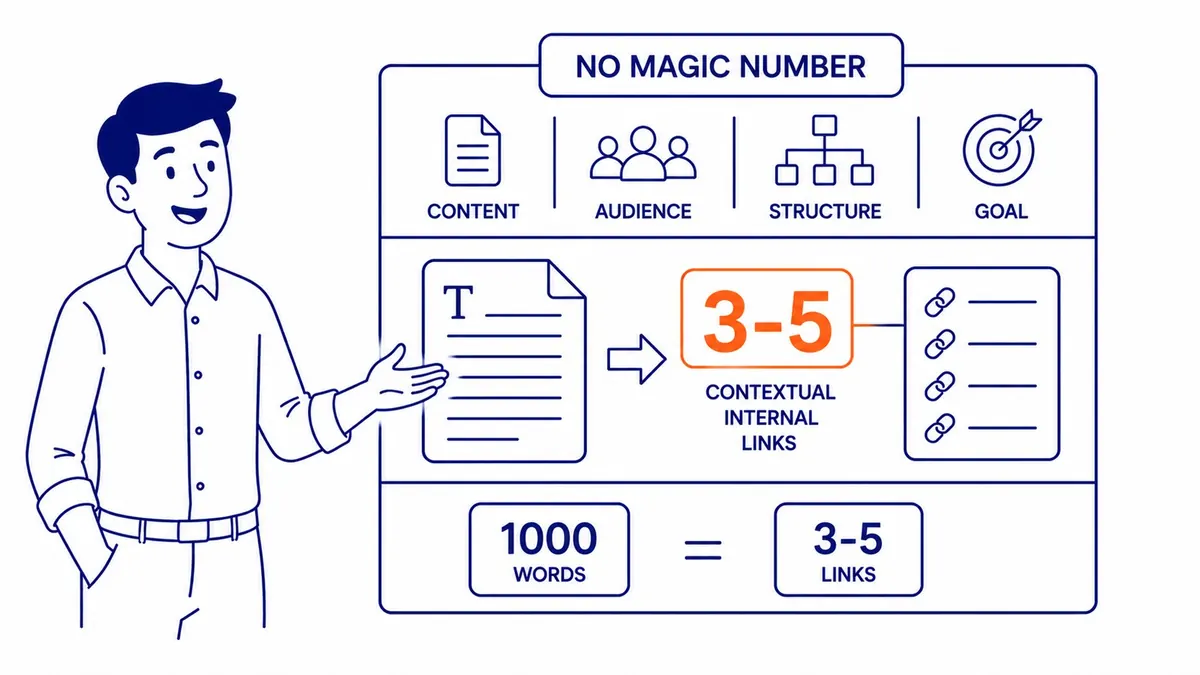
Want a single safe default to start from? Here it is. Three to five contextual internal links for every 1,000 words, all of them relevant. That will not get you penalized. It will not strand a page either. Treat it as a floor you raise when more relevant destinations exist, not a quota you pad to reach. The danger with any default is mechanical use, dropping a fifth link onto a page that only had four good homes for one. A relevant four beats a forced five on every page I have ever audited. Sound internal linking best practices reward judgment, not arithmetic. The same judgment applies outward, where dofollow links and page authority meet.
Links on the page vs links to the page
Now the distinction I promised. The one that changes how you think about all of this.
Links ON a page are the ones you place in your content, pointing outward. The links TO a page come from elsewhere on your site, pointing inward at it. Most advice fixates on the first. The research lives in the second. One study is worth knowing. Zyppy crunched more than 23 million internal links across 1,800 sites. URLs with 40 to 44 incoming internal links pulled roughly four times more Google Search clicks than URLs with zero to four. The correlation kept climbing toward 45 to 50 incoming links per URL, then leveled off.
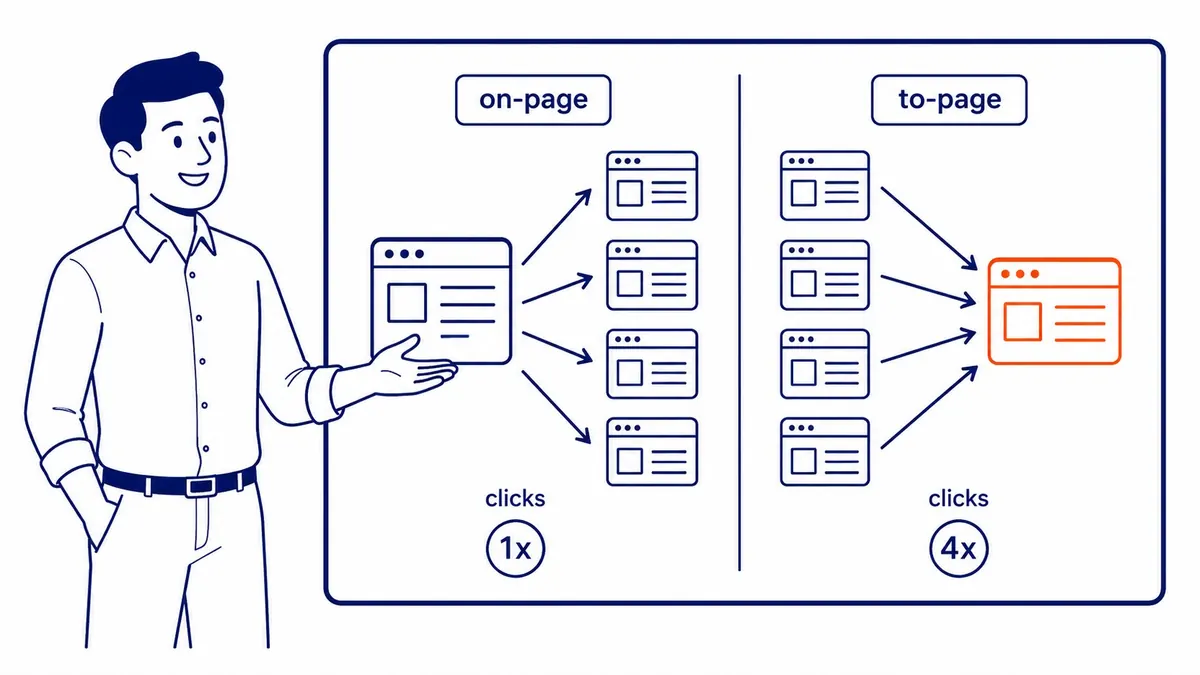
Read that again. Four times the clicks. Tied to how many of your own pages point at a URL, not how many links that URL contains. So the lever you actually pull is incoming links to your money pages. The pages that drive revenue, the ones you want ranking, those deserve dozens of relevant internal links aimed at them from across the site. Picture your single most important URL right now. How many other pages on your site link to it? If the honest answer is three or four, you have just found your next month of work.
Then the flip side, the silent failure mode. Ahrefs found 66.2 percent of sites have at least one page with a single dofollow incoming internal link. Just one. That page is barely connected, almost orphaned, and the rankings show it. A true orphan page, zero incoming internal links, is nearly invisible to search engines and to visitors clicking through your site. Orphans turn up on most audits I run. Fixing them is often the quickest ranking win available. You can see what steady structural work produces in our SEO portfolio. The takeaway is blunt. Stop counting the links on your page. Start counting the links pointing at the pages you care about.
Can you have too many internal links?
Yes. Though probably not in the way you are worried about.
The genuine downsides are real but modest. Spread your passable value across too many outgoing links and each one carries less. Pile links onto low-value pages and you waste crawl budget, sending Google chasing thin URLs instead of the important ones. Cram a paragraph with links and users tune them out, which dents the user experience you were trying to lift. There is a cautionary tale here. Back in 2014, after a Google update, eBay watched traffic collapse. The pages at fault had over-linked aggressively to low-value internal destinations. A large share of their targeted keywords dropped off the first page. Scale magnifies mistakes. Most businesses will never run at the scale where that becomes a risk, though. Worth remembering before you panic over a link count.
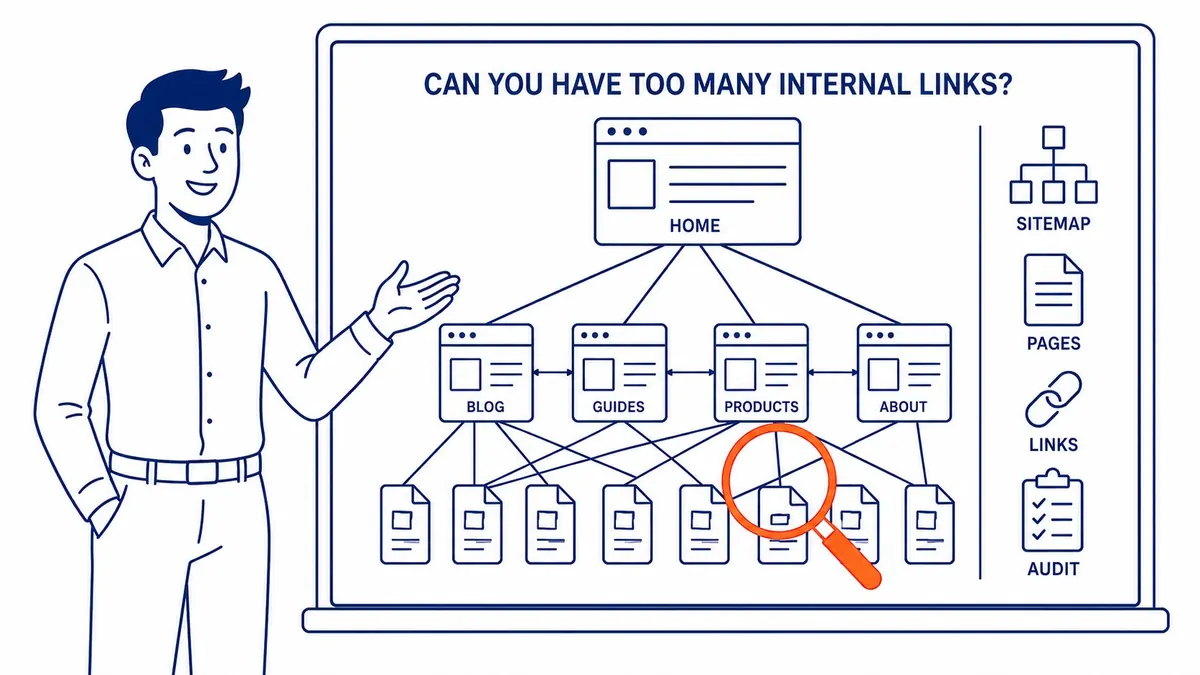
But here is what local audits taught me. The “too many links” panic aims at the wrong sites. Massive publishers and e-commerce catalogues auto-generating links on every page, sure, they can overdo it. The typical small or mid-sized business has the opposite problem. Too FEW internal links. Service pages connected to nothing. Blog posts that point nowhere. Whole sections of the site stranded. So before you prune links out of fear, ask one thing. Is the site actually over-linked, or just disorganized? Nine times in ten on the sites I see, it is the latter. The fix is adding thoughtful links, not stripping them.
There is one situation where cutting links is the right call. Worth naming. A page that used to rank slips, and a crawl shows it firing fifty or sixty links into low-value corners of your site. Thinning those can help concentrate what the page passes along. A real fix for a real symptom. Also rare. Far more often a ranking drop traces to a content or technical issue with nothing to do with link counts. So do not reach for link pruning on reflex. Diagnose first. Cut links only when the evidence points there, not because a number felt high. Counting links is not diagnosis, a distinction internal and external linking in SEO explained covers well. Outbound is a separate conversation, and the truth about external links is less alarming.
Count your template links before your body links
Here is the math almost nobody does. It reframes the whole conversation.
Open any page on your website. Count the links before you reach the article. The navigation menu. Your footer. Maybe a sidebar, if you run one. On a typical WordPress business site, those template elements alone can spend 30 to 60 links per page before a single word of body copy loads. Every page inherits them. So when a guide tells you to “keep it under 100 links,” remember your template already ate a big chunk of that budget on autopilot. Most owners count their body links and stop there. They never tally the boilerplate doing the quiet spending.
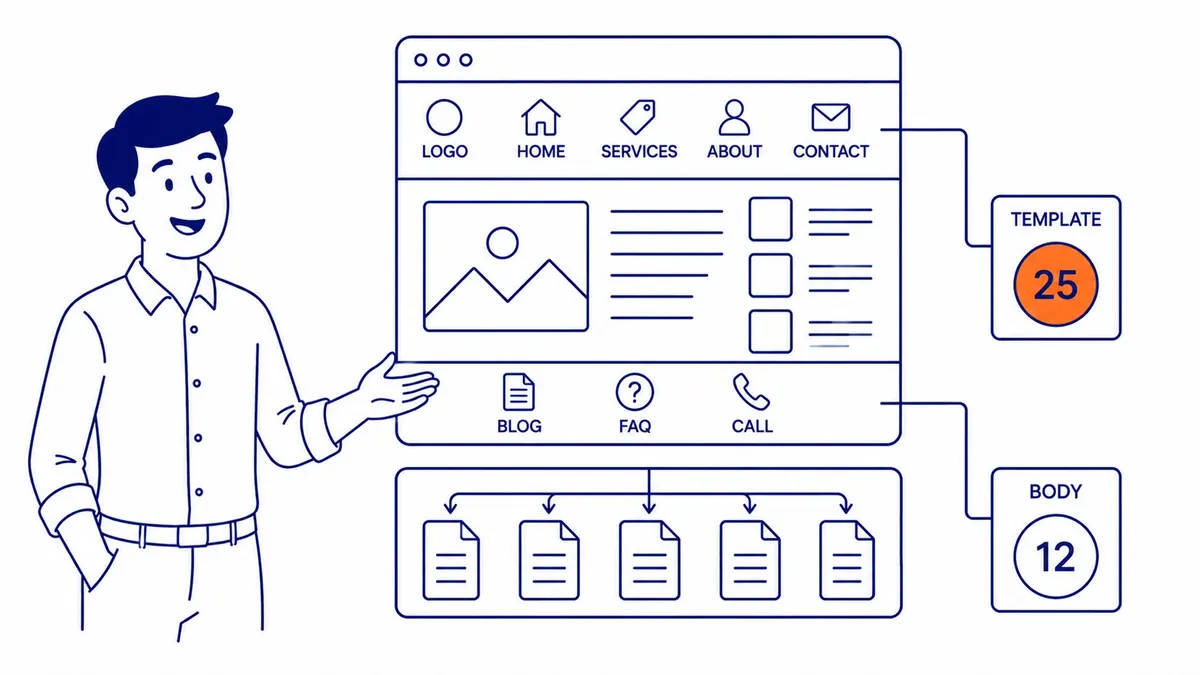
This matters for two reasons. First, template links repeat site-wide and carry far less weight than a deliberate contextual link inside your content, since search engines recognize boilerplate. Second, a nav and footer bloated with low-priority links dilute the equity flowing to the pages that matter, on every single page at once. So a quick win on many sites is trimming the footer down to the genuinely important destinations. Your contextual body links, the ones you actually thought about, then sit on a leaner foundation and pull more weight. Count the template first. Build your editorial linking on what is left.
The local-business reality: most sites need more, not fewer
Run a business here in Calgary, or anywhere with a local customer base, and this section is the one that pays off.
National SEO blogs write for content machines publishing fifty articles a month. Your situation is different. A handful of service pages. Maybe some location pages. A steady trickle of blog posts. And not nearly enough connections between them. That is the pattern, again and again. A plumber with eight service pages and zero links between them. One clinic I worked with had great blog content that never once linked back to the booking page. Whole sections that should reinforce each other, sitting in total isolation.

The fixes are not complicated. They do take a pass through the whole site, though. Link every service page to the related services a customer commonly needs alongside it. Connect each blog post to the service it naturally supports, so a post on furnace efficiency points at the heating service page. Aim your strongest, most-visited pages at the newer ones you want to rank. And hunt the orphans, the pages with nothing pointing at them, because those are pure wasted potential. This kind of structural SEO work is exactly what we focus on at To-The-TOP!, and it is why local search engine optimization in Calgary rewards consistent effort far more than any single clever tactic. The businesses that win are not the ones with the most pages. They are the ones whose pages actually talk to each other.
City pages deserve a specific mention. They are the ones most often left stranded. A business serving several towns will spin up a page for each, then forget to connect them. Each location page should link to the core service it covers and up to a main hub, and ideally sideways to a couple of the other locations, so the cluster reads as a deliberate group rather than a pile of doorway pages. Done well, that web of links tells search engines these areas are all genuinely served by one credible business. Neglected, or skipped, every location page fights alone with no support from the rest of the site. The difference in how those two patterns rank is not subtle.
Anchor text and placement
Where a link sits, and what it says, both change how much it does.
Anchor text, the clickable words, should describe the destination plainly. “Read our guide to keyword research” tells the reader and the search engine exactly what waits on the other side. “Click here” tells them nothing. So use descriptive anchors that hint at the destination’s topic. Vary them across links pointing at the same page rather than repeating the identical phrase. That variety helps Google grasp the full range a page covers, including the longer, more specific searches you want to capture. Do not overdo it, though. Cram exact-match keywords into every anchor and it reads as manipulation, working against you.
Placement matters just as much. A link high in the body pulls more weight and more clicks than the same link buried in a footer. Search engines lean toward the first link to a given URL on a page. So the contextual one near the top tends to count most. Put your important internal links where readers actually are, in the flow of the text near the top. Not stranded at the bottom in a “related posts” afterthought. Useful links inside real sentences beat a tidy list nobody reads.

There is a reason placement carries weight, and it is more intuitive than it sounds. Google has long modelled link value partly on how likely a real person is to click, an idea sometimes called the reasonable surfer. A link inside a sentence someone is reading gets clicked far more often than one in a crowded footer. So the engine treats it as a stronger signal. Common sense, really. The links that help readers are the links that count. Good anchor text choices fall out of solid keyword research, since the words people search for usually make the clearest, most descriptive anchors.
Site structure: the 3-click rule, clusters, and pillars
Structure is the frame your linking hangs on. Get it right and individual links do more work.
The old guideline holds up. Any important page should sit within about three clicks of the homepage. Part of the reasoning is crawlers. The rest is people, since both give up on pages buried too deep. There is data behind it, too. Pages one to three clicks from the homepage have been found to pull roughly nine times the search traffic of ones four or more clicks down. Depth buries them. Shallow, well-linked structures surface them. Depth is not only a crawler problem, either. Real visitors quit long before they reach page five of your navigation.
Topic clusters are how you build that shallow structure on purpose. Pick a broad subject. Write one thorough pillar page covering it from the top. Then write supporting articles on the sub-topics. Link every supporting piece up to the pillar, and back down again. That hub-and-spoke pattern concentrates relevance. It marks the pillar as your authority page on the subject. And it keeps everything within a click or two. It also makes the next linking call obvious, since you already know which pages belong to which cluster. Structure first. Then the links almost place themselves.
Some people prefer the older silo model, where each topic stays walled off and links rarely cross sections. It still works, mostly on large sites that need rigid organization. The hub-and-spoke cluster is the gentler version of the same idea. Easier for most businesses to maintain, too, since it does not demand strict discipline about never linking across topics. Either way, the goal is identical. Group related pages. Point them at a clear anchor. Make sure nothing important sits more than a couple of clicks from where a visitor lands. The model is just scaffolding. Linking does the actual work.
How to audit your internal links
You cannot fix what you have not measured. Good news is the first tool costs nothing.
Start with Google Search Console. Free, and already tied to your site. It carries an internal links report. That report ranks your pages by how many internal links point at each one. The bottom of that list is your orphan and near-orphan problem, laid out plainly. That bottom stretch is exactly where the quiet ranking losses hide. For a budget-conscious business, that single free report answers most of the questions this article raises. Sort by fewest incoming links and there is your to-do list.
Need more depth? The paid crawlers earn their keep. Screaming Frog crawls the whole site. One pass flags broken internal links, redirect chains, and orphan pages. Ahrefs and Semrush run similar audits with their own reporting layered on top. What you hunt for stays consistent. Broken links sending visitors to dead ends. Orphan pages with no incoming links. URLs buried too many clicks deep. Important pages starved of internal links while trivial ones drown in them. Run this check a couple of times a year, more often if you publish heavily, and the structure stays healthy instead of quietly rotting. Most of the worst problems I find were invisible to the owner until a crawl surfaced them. One audit last year turned up forty-odd orphan pages on a site the owner swore was tidy. Nobody buried them on purpose. They had simply never been linked from anywhere once they went live.
A simple internal-linking routine for a busy business
You do not need a complicated system. What you need is a habit you will actually keep.
Here is the one I hand clients who run their own sites. Every time you publish a new page, two things before you hit publish. Add two to five contextual links pointing out to genuinely related pages. Then open one or two of your established pages and drop a link from them into the new piece. That second step is the one everyone forgets. It is also the one that gets the new page discovered and ranking faster. Out and in, every time. Ten minutes. Compare that to the cost of a URL that never ranks because nothing points at it. The habit is cheap. Neglect is what gets expensive.
Then, once a month or so, pull up that Search Console internal links report and scan the bottom for orphans and near-orphans. Fix the worst few. That is the whole routine. No software beyond what you already have. Be honest about the timeline, though, because internal linking is not an overnight switch. Like most of SEO, it compounds over months as crawlers re-process your structure and the equity settles where you sent it. Steady beats clever here. Need paid traffic while the organic side matures? That is a separate conversation, and our Google Ads management work runs alongside SEO for exactly that reason. The structural work, meanwhile, keeps paying off the longer you stay consistent.
Frequently Asked Questions
What is the 80/20 rule in SEO?
Roughly 80 percent of your results come from 20 percent of your effort. It maps neatly onto internal linking. A small set of pages, your pillars and top services, deserve the bulk of your incoming internal links. Find that vital 20 percent. Aim your strongest pages at them. Push fresh internal links into new content within a day or two of publishing, so it gets discovered fast. Most of your SEO gains trace back to that focused handful, not to spreading attention evenly across every URL.
Is SEO dead or evolving in 2026?
Evolving, not dead. The people calling it dead have been wrong for fifteen years running. Search behaviour keeps shifting toward AI-assisted answers and richer results, sure. The underlying mechanics still hold, though. Search engines still crawl links. Still weigh authority. They reward sites that organize content well and connect it sensibly. Internal linking matters as much as it ever did, arguably more, since clear structure helps both traditional crawlers and the newer AI systems work out what your site is about. Different surface. Same foundation.
What are the 3 C’s of SEO?
Content, code, and credibility, in the version most practitioners use. Content means genuinely useful material that answers what searchers want. Code is the technical side, meaning crawlability, site speed, clean structure, and yes, sound internal linking. Credibility is the authority you earn over time, through quality backlinks and a reputation that holds up. Internal linking sits squarely in the code pillar. It quietly props up the other two as well, since it helps your best content get found and your authority flow where it belongs.
Can you have too many internal links on one page?
Technically yes. Though it is rarely the real problem for a normal business site. Pack a page with dozens of low-value links and three things happen at once. Each one passes less value along. You waste a slice of crawl budget. And the people reading get annoyed. The practical ceiling is about usefulness, not a hard count. If every link genuinely helps the reader, you are fine well past any number a blog post quotes. Far more sites suffer from too few thoughtful internal links than too many. So unless a page is visibly stuffed, add helpful links rather than fretting about the maximum.
Contact Calgary SEO Company To-The-TOP!
Questions about anything in this article, or about your own rankings? Talk to a Calgary SEO specialist directly.
Phone: (403) 308-5949
Address: 1509 14 Ave SW, Calgary, AB T3C 0W4
Hours:
Monday to Friday: 10:00 am – 7:00 pm
Saturday: 12:00 pm – 4:00 pm
Sunday: closed